


© 2026 minigame.com

Únete a los Minis con tus amigos



Recomendado










Fruit Shelf Master
- Calificación
- 5
- Orientación
- Vertical
- Fecha de lanzamiento
- 2026-09-14
Fruit Shelf Master: Free Online Fruit Sorting Game
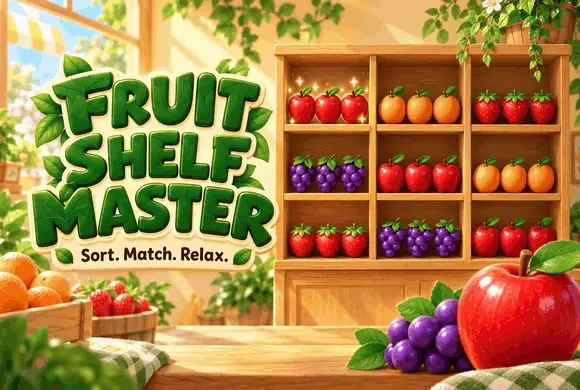
Fruit Shelf Master is a single-player fruit-sorting and triple-matching puzzle game. Players rearrange colorful items on wooden shelves, bring three identical items together, and clear matches before the timer runs out. Play it online on MiniGame directly in your browser, with no download required. Set in a bright fruit-shop environment, the game combines satisfying organization with timed puzzle challenges. Every move changes the shelf layout, so spotting a match is only part of the task. You also need to manage the available space and decide which items to move next.
How to Play Fruit Shelf Master
1. Look across the shelves for identical fruit and other matching items. 2. Move items into available shelf spaces to bring matching items together. 3. Group three identical items to clear them. 4. Use the space you create to organize the remaining items. 5. Complete the level’s objective before time runs out. Follow the in-game tutorial to learn the movement controls and matching rules.
What Makes the Game Fun?
Fruit Shelf Master turns a crowded shelf into a compact organizing challenge. Clearing one group opens space for another move, creating a satisfying rhythm of sorting, matching, and clearing. The colorful fruit artwork and warm wooden shelves give the game a cheerful setting, while the countdown adds urgency. Players who enjoy goods-sorting games, triple-match puzzles, and quick organization challenges can jump into a level and work toward a clear objective.
Helpful Power-Ups
Power-ups offer different ways to handle a difficult layout. Depending on what you have unlocked and your remaining inventory, you can clear matching items, refresh the arrangement, change items, or temporarily freeze the timer. Each use consumes a power-up, so consider whether a normal move can solve the problem before spending one. Saving a useful tool for a crowded shelf or a nearly finished timer can make a difference.
Tips for Clearing the Shelves
Scan the whole board before moving an item. Look for groups that need only one more matching item. Keep some shelf space available for rearranging items. Prioritize moves that create another match. Watch the timer and use power-ups when they can help you progress.
Frequently Asked Questions
Q: What is Fruit Shelf Master?
A: Fruit Shelf Master is a browser-based sorting puzzle in which you organize fruit and other shelf items into matching groups of three.
Q: What is the goal of the game?
A: The goal is to clear matching items and complete the level’s objective before the countdown ends.
Q: Is Fruit Shelf Master free to play?
A: You can play Fruit Shelf Master for free online on MiniGame.
Q: Do I need to download the game?
A: No download is required. Open the game page on MiniGame and play in your browser.
Q: Does Fruit Shelf Master have a timer?
A: Yes. Levels include a countdown, and a freeze power-up can temporarily pause the timer when available.
Q: What can I do if I get stuck?
A: Look for a move that frees up shelf space or completes a group of three. You can also use an available power-up to help with the layout.
Q: Who might enjoy Fruit Shelf Master?
A: The game suits players who enjoy fruit puzzles, goods sorting, triple matching, and short casual puzzle sessions. Play Fruit Shelf Master on MiniGame and see how neatly you can clear the shelves. Sort. Match. Relax.

Pixel Art Stealer
 409.1K
Jelly Stack Crush
492.0K
Sand Sift
482.1K
Cat Mouse
395.7K
Shape Merge
414.1K
Crazy Bubble Pop
843.6K
Happy Match
279.4K
Pop Stone2
4.8M
Bubble Legend
1.2M
Best Link
359.0K