


© 2026 minigame.com

Únete a los Minis con tus amigos



Recomendado








Arrow
- Calificación
- 5
- Orientación
- Vertical
- Fecha de lanzamiento
- 2026-11-19
Play Arrow Game
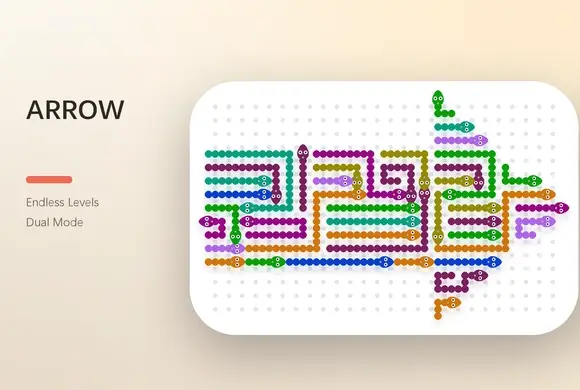
Welcome to Arrow Game, a clever and addictive puzzle game where your goal is to remove every arrow from the board. Tap an arrow to send it moving in the direction it points, but make sure its path is clear. Other arrows can block the way, so you must study the entire puzzle and choose the correct removal order. With clean graphics, intuitive controls, timed levels, and increasingly complex layouts, Arrow Game offers a satisfying challenge for puzzle fans. Play on MiniGame directly in your browser and see how many levels you can complete. Get ready to test your observation, planning, and problem-solving skills! Clear exposed arrows first, open new escape routes, and carefully untangle the crowded board before time runs out. You have three hearts, so avoid blocked moves and think before every tap. Can you remove all the arrows and master both Normal and Drop modes?
Key Game Features
Strategic Arrow Puzzles: Tap arrows and remove them from the board by sending each one in the direction it points. Challenging Levels: Solve increasingly complicated arrangements filled with overlapping paths and tightly packed arrows. Two Game Modes: Progress through Normal mode and unlock Drop mode for a different style of arrow-clearing challenge. Limited Time and Lives: Complete each puzzle before the timer reaches zero while protecting your three hearts. Helpful Puzzle Tools: Use hints and removal tools when you need assistance with a difficult arrow arrangement. Flexible Board Controls: Drag the board to explore the puzzle and use pinch gestures, the mouse wheel, or zoom controls for a closer view.
How to master Arrow Game
Getting started in Arrow Game is easy, but clearing every puzzle requires careful planning. Your objective is to remove all the arrows before time runs out. Each arrow travels in the direction of its arrowhead, and it can only escape when no other arrow blocks its route. First, examine the edges of the puzzle and look for arrows pointing toward open space. These arrows are usually the safest ones to remove. Tap or click an available arrow and watch it travel off the board, creating more room for the remaining pieces. Next, study how the arrows block one another. Removing one arrow may open a path for several others, while choosing the wrong arrow can cost you a heart. Avoid tapping randomly and plan a short sequence of moves whenever possible. As the layouts become larger, drag the board to inspect different areas and zoom in when arrows are packed closely together. Keep an eye on the timer and use available hints or removal tools carefully. Clear every arrow to complete the level and continue to more challenging puzzles.
Game Controls
Click an arrow with the mouse or tap it on a touchscreen to send it moving in the direction it points. The arrow will be removed if its route is clear. Click and drag, or swipe, to move around larger puzzles. Pinch with two fingers to zoom on mobile devices. On a computer, use the mouse wheel or the on-screen zoom controls to adjust the board size. Study each path carefully and avoid selecting arrows that are blocked by other pieces.
Frequently Asked Questions
Q: What is Arrow Game?
A: Arrow Game is an online puzzle game where you remove directional arrows from a crowded board. Each arrow must have a clear path in the direction it points before it can escape.
Q: How do I play Arrow Game?
A: Tap or click an arrow to move it in the direction of its arrowhead. Start with arrows that point toward open space, then continue removing pieces until the entire board is clear.
Q: What happens if an arrow is blocked?
A: Selecting a blocked arrow counts as a mistake and can cost you one of your hearts. Study the surrounding paths before making each move.
Q: What game modes are available in Arrow Game?
A: Arrow Game includes Normal mode and Drop mode. Progress through Normal mode to unlock additional Drop mode challenges.
Q: Can I play Arrow Game online for free?
A: Yes! You can play Arrow Game for free on MiniGame directly in your browser. No separate installation is required.
Escape Amaze
 873.5K

Bottle Flip 2D Game
685.4K
Destroy Galaxy
884.5K
Pregnant Twins Newborn Care
328.6K
Litter Painter Dress Up Story
708.7K
Bird Sort Puzzle
191.3K
Save Driving
671.8K
Goods Triple Match
674.8K
Pixel Color
498.4K
Color Border
260.2K