





logologo
Search anything...
search_icon
lang_switch_icon
notify_icon
search_iconAll
nav_link_icon
search_iconContinue Playing
nav_link_icon
search_iconHot Games
nav_link_icon
search_iconNew Games
nav_link_icon
search_iconSimulation
nav_link_icon
search_iconAdventure
nav_link_icon
search_iconAction
nav_link_icon
search_iconStrategy
nav_link_icon
search_iconCasual
nav_link_icon
search_iconRacing
nav_link_icon
search_iconPuzzle
nav_link_icon
search_iconSports
nav_link_icon
search_icon
search_icon
search_icon
search_icon
search_icon
search_icon
search_icon
search_icon
search_icon
search_icon
search_icon
search_icon
Your browser does not support the video tag or this video format.
Play Now
Ludo King

Ludo King

Ludo King

Ludo King

5boardBoard
Play Now
Like
Dislike
Add to favorites
Feedback
Ludo King
Advertisement
Advertisement
My Garden Flower Match

My Garden Flower Match

My Garden Flower Match585.2K
Fruit Sort Master

Fruit Sort Master

Fruit Sort Master243.1K
Merge Rush Z

Merge Rush Z

Merge Rush Z578.1K
Tetris Puzzle

Tetris Puzzle

Tetris Puzzle697.3K
Knife Throwing

Knife Throwing

Knife Throwing891.8K
Basketball Daily

Basketball Daily

Basketball Daily652.5K
Buy To Buy

Buy To Buy

Buy To Buy474.3K
Graffiti Squares

Graffiti Squares

Graffiti Squares396.3K
Shooting Hoops

Shooting Hoops

Shooting Hoops786.8K
Ball Hits Cup

Ball Hits Cup

Ball Hits Cup261.1K
Advertisement
My Garden Flower Match

My Garden Flower Match

My Garden Flower Match585.2K
Fruit Sort Master

Fruit Sort Master

Fruit Sort Master243.1K
Merge Rush Z

Merge Rush Z

Merge Rush Z578.1K
Tetris Puzzle

Tetris Puzzle

Tetris Puzzle697.3K
Knife Throwing

Knife Throwing

Knife Throwing891.8K
Basketball Daily

Basketball Daily

Basketball Daily652.5K
Buy To Buy

Buy To Buy

Buy To Buy474.3K
Graffiti Squares

Graffiti Squares

Graffiti Squares396.3K
Shooting Hoops

Shooting Hoops

Shooting Hoops786.8K
Ball Hits Cup

Ball Hits Cup

Ball Hits Cup261.1K
Advertisement
mascot

Company Info

AboutBusinessPrivacyTerms

Join Us

logo

© 2026 minigame.com

AboutBusinessPrivacy
logo

© 2026 minigame.com

Gamesbutton_jump_icon
Boardbutton_jump_icon
Ludo King

Ludo King

Rating
5
Orientation
Portrait
Release Date
2024-05-24
BoardPuzzle

What is Ludo King

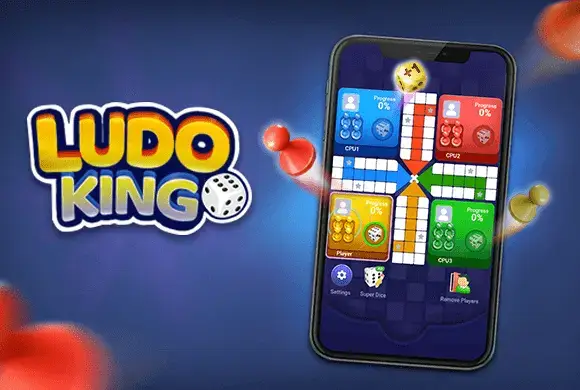
"Ludo King" is a modern digital adaptation of the royal game of Pachisi, bringing the classic board game experience right to your fingertips. Loved by millions of players worldwide, this casual strategy game allows you to enjoy the thrill of rolling the dice and racing your tokens to the center of the board. Whether you are looking for a quick match against intelligent computer bots or a fun game night with friends and family using the local multiplayer mode, "Ludo King" has you covered. The game features vibrant graphics, smooth animations, and customizable settings to tailor your gameplay experience. With its simple rules and engaging mechanics, it is the perfect game to pass the time and relive childhood memories. Roll the dice, plan your moves carefully, and race to become the ultimate king of the board!

Key Game Features

Classic Gameplay: Enjoy an authentic Ludo experience with traditional rules and a colorful board layout. Multiple Modes: Play against AI bots or enjoy local multiplayer with up to 4 players on a single device. Customizable Settings: Adjust game rules, difficulty levels, and audio to suit your personal preferences. Super Dice Feature: Watch a short ad to unlock a "Super Dice" for a strategic advantage when you need a specific number.

How to Play & Master

Starting your journey in Ludo King is simple and straightforward. Step 1: Choose Your Mode. Upon launching the game, select between different game modes. The video demonstrates the "Bot" mode for solo play against AI, and the "Local" mode for passing and playing with friends on the same screen. Step 2: Select Players. After choosing a mode, decide how many players will participate (2P, 3P, or 4P). In Bot mode, you'll pick your color and the number of AI opponents. In Local mode, you can assign human or bot players to each color slot. Step 3: Start the Match. Once the players are set, hit "Play" to enter the colorful Ludo board. Step 4: Roll the Dice. The game proceeds in turns. When it is your turn, tap the dice icon to roll. You must roll a '6' to move a token out of your starting base and onto the track. Step 5: Move Your Tokens. After a token is on the track, roll the dice again and tap the token you want to move forward by the number shown on the dice. Step 6: Reach the Center. Your goal is to navigate all four of your colored tokens around the entire board and up the home column to the center area before your opponents do. Watch out—if an opponent lands on your token, it gets sent back to the base!

Game Controls

Tap to Play: The entire game is controlled by simple screen taps. Tap the dice area to roll it, and tap a specific token on the board to move it.

Frequently Asked Questions (FAQ)

Q: Do I need an internet connection to play? A: No! The "Bot" and "Local" modes shown in the video can be played entirely offline. Q: How do I get my token out of the starting base? A: You must roll a "6" on the dice to bring a token from your base onto the starting square of the track. Rolling a 6 also gives you an extra turn! Q: What does the "Super Dice" do? A: The "Super Dice" allows you to select the exact number you want to roll (from 1 to 6) after watching an advertisement. It's very useful for getting out of the base or landing a perfect hit on an opponent.

Gamesbutton_jump_icon
Boardbutton_jump_icon
Ludo King

Ludo King

Rating
5
Orientation
Portrait
Release Date
2024-05-24
BoardPuzzle

What is Ludo King

"Ludo King" is a modern digital adaptation of the royal game of Pachisi, bringing the classic board game experience right to your fingertips. Loved by millions of players worldwide, this casual strategy game allows you to enjoy the thrill of rolling the dice and racing your tokens to the center of the board. Whether you are looking for a quick match against intelligent computer bots or a fun game night with friends and family using the local multiplayer mode, "Ludo King" has you covered. The game features vibrant graphics, smooth animations, and customizable settings to tailor your gameplay experience. With its simple rules and engaging mechanics, it is the perfect game to pass the time and relive childhood memories. Roll the dice, plan your moves carefully, and race to become the ultimate king of the board!

Key Game Features

Classic Gameplay: Enjoy an authentic Ludo experience with traditional rules and a colorful board layout. Multiple Modes: Play against AI bots or enjoy local multiplayer with up to 4 players on a single device. Customizable Settings: Adjust game rules, difficulty levels, and audio to suit your personal preferences. Super Dice Feature: Watch a short ad to unlock a "Super Dice" for a strategic advantage when you need a specific number.

How to Play & Master

Starting your journey in Ludo King is simple and straightforward. Step 1: Choose Your Mode. Upon launching the game, select between different game modes. The video demonstrates the "Bot" mode for solo play against AI, and the "Local" mode for passing and playing with friends on the same screen. Step 2: Select Players. After choosing a mode, decide how many players will participate (2P, 3P, or 4P). In Bot mode, you'll pick your color and the number of AI opponents. In Local mode, you can assign human or bot players to each color slot. Step 3: Start the Match. Once the players are set, hit "Play" to enter the colorful Ludo board. Step 4: Roll the Dice. The game proceeds in turns. When it is your turn, tap the dice icon to roll. You must roll a '6' to move a token out of your starting base and onto the track. Step 5: Move Your Tokens. After a token is on the track, roll the dice again and tap the token you want to move forward by the number shown on the dice. Step 6: Reach the Center. Your goal is to navigate all four of your colored tokens around the entire board and up the home column to the center area before your opponents do. Watch out—if an opponent lands on your token, it gets sent back to the base!

Game Controls

Tap to Play: The entire game is controlled by simple screen taps. Tap the dice area to roll it, and tap a specific token on the board to move it.

Frequently Asked Questions (FAQ)

Q: Do I need an internet connection to play? A: No! The "Bot" and "Local" modes shown in the video can be played entirely offline. Q: How do I get my token out of the starting base? A: You must roll a "6" on the dice to bring a token from your base onto the starting square of the track. Rolling a 6 also gives you an extra turn! Q: What does the "Super Dice" do? A: The "Super Dice" allows you to select the exact number you want to roll (from 1 to 6) after watching an advertisement. It's very useful for getting out of the base or landing a perfect hit on an opponent.