





Recommended


Chess Classic
- Rating
- 5
- Orientation
- Portrait
- Release Date
- 2023-08-31
What is Chess Classic
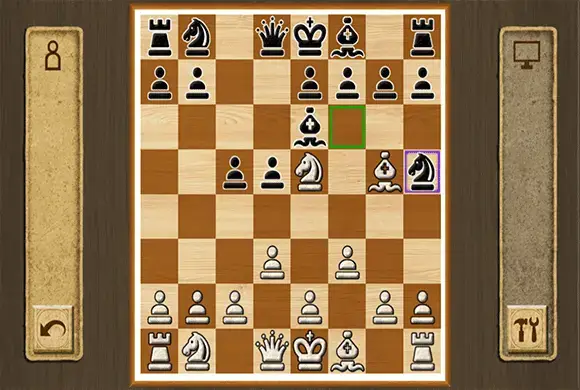
"Chess Classic" brings the world's most revered strategy board game to your mobile device with an elegant, traditional design. Whether you are a grandmaster or a beginner learning the ropes, this game offers a pure and unadulterated chess experience. Featuring a beautiful wood-grain interface and classic 2D piece designs, it focuses on what matters most: the gameplay. You can choose to sharpen your skills by playing against a challenging computer AI with adjustable difficulty levels, or you can share the screen with a friend for a classic 1v1 local multiplayer match. The game highlights valid moves for your selected piece, making it accessible for new players while providing the deep, strategic complexity that chess veterans crave. Dive into the ultimate test of logic and foresight with "Chess Classic."
Key Game Features
Classic Board Game: Experience the authentic rules and strategy of traditional chess. Single Player Mode: Play against a smart AI to improve your tactical skills. 2-Player Local: Challenge a friend on the same device in a 1v1 match. Move Assistance: Highlights legal moves and captures to help beginners learn. Elegant Design: Enjoy a relaxing, realistic wood-grain aesthetic. Offline Play: No internet required; play a match anytime, anywhere.
How to Play & Master
The objective of Chess is to checkmate your opponent's King, meaning the King is under attack and cannot escape. Setup: The game starts with 16 pieces for each player (White and Black) arranged on an 8x8 grid. White always moves first. Selecting a Piece: Tap on the piece you want to move. The game will highlight all the legal squares that piece can move to with a green or purple border. Moving: Tap on one of the highlighted squares to move your piece there. Piece Movement:
Game Controls
Tap: Select a piece to see its valid moves. Tap Again: Tap a highlighted square to move the selected piece to that location.
Frequently Asked Questions (FAQ)
Q: Can I undo a move?
A: Many classic chess apps have an "undo" button in the menu (often an arrow pointing back) if you make a mistake against the AI.
Q: What does the "brain" icon do in the menu?
A: The brain icon with a number (e.g., 1, 2, 3) usually allows you to adjust the difficulty level of the AI opponent.
Q: How do I play with a friend?
A: Select the icon with two people (88) on the main menu to start a local 2-player game where you pass the device back and forth.

Buy To Buy
 474.3K
Graffiti Squares
396.3K
Ball Hits Cup
261.1K
Tetris:Drop Version
763.4K
Flying Knife Juice
338.1K
Draw Lines
857.3K
Brain Puzzle
626.1K
Hexa Sort
459.0K
Magic Match
787.6K
Super Brain
854.4K