

logologo
Search anything...
search_icon
lang_switch_icon
notify_icon
search_iconAll
nav_link_icon
search_iconContinue Playing
nav_link_icon
search_iconHot Games
nav_link_icon
search_iconNew Games
nav_link_icon
search_iconSimulation
nav_link_icon
search_iconAdventure
nav_link_icon
search_iconAction
nav_link_icon
search_iconStrategy
nav_link_icon
search_iconCasual
nav_link_icon
search_iconRacing
nav_link_icon
search_iconPuzzle
nav_link_icon
search_iconSports
nav_link_icon
aboutAbout
nav_link_icon
businessBusiness
nav_link_icon
privacyPrivacy
nav_link_icon
termsTerms
nav_link_icon

© 2026 minigame.com

home
recetlyplayed
hotgames
newgames
simulation
adventure
action
strategy
casual
racing
puzzle
about
business
privacy
terms
Your browser does not support the video tag or this video format.
Play Now
Chess Classic

Chess Classic

Chess Classic

Chess Classic

5puzzlePuzzle
Play Now
Like
Dislike
Add to favorites
Feedback
Chess Classic
Advertisement
Gamesbutton_jump_icon
Puzzlebutton_jump_icon
Chess Classic

Chess Classic

Rating
5
Orientation
Portrait
Release Date
2023-08-31
Puzzle

What is Chess Classic

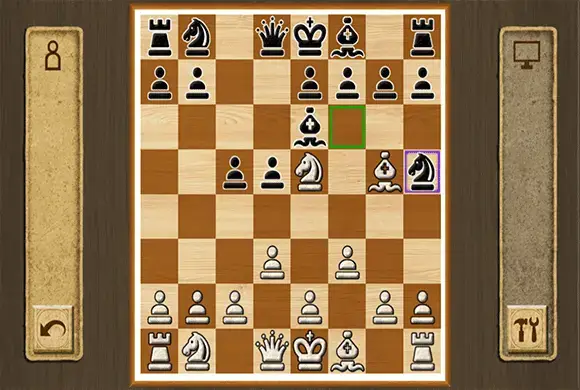
"Chess Classic" brings the world's most revered strategy board game to your mobile device with an elegant, traditional design. Whether you are a grandmaster or a beginner learning the ropes, this game offers a pure and unadulterated chess experience. Featuring a beautiful wood-grain interface and classic 2D piece designs, it focuses on what matters most: the gameplay. You can choose to sharpen your skills by playing against a challenging computer AI with adjustable difficulty levels, or you can share the screen with a friend for a classic 1v1 local multiplayer match. The game highlights valid moves for your selected piece, making it accessible for new players while providing the deep, strategic complexity that chess veterans crave. Dive into the ultimate test of logic and foresight with "Chess Classic."

Key Game Features

Classic Board Game: Experience the authentic rules and strategy of traditional chess. Single Player Mode: Play against a smart AI to improve your tactical skills. 2-Player Local: Challenge a friend on the same device in a 1v1 match. Move Assistance: Highlights legal moves and captures to help beginners learn. Elegant Design: Enjoy a relaxing, realistic wood-grain aesthetic. Offline Play: No internet required; play a match anytime, anywhere.

How to Play & Master

The objective of Chess is to checkmate your opponent's King, meaning the King is under attack and cannot escape. Setup: The game starts with 16 pieces for each player (White and Black) arranged on an 8x8 grid. White always moves first. Selecting a Piece: Tap on the piece you want to move. The game will highlight all the legal squares that piece can move to with a green or purple border. Moving: Tap on one of the highlighted squares to move your piece there. Piece Movement:

Game Controls

Tap: Select a piece to see its valid moves. Tap Again: Tap a highlighted square to move the selected piece to that location.

Frequently Asked Questions (FAQ)

Q: Can I undo a move? A: Many classic chess apps have an "undo" button in the menu (often an arrow pointing back) if you make a mistake against the AI. Q: What does the "brain" icon do in the menu? A: The brain icon with a number (e.g., 1, 2, 3) usually allows you to adjust the difficulty level of the AI opponent. Q: How do I play with a friend? A: Select the icon with two people (88) on the main menu to start a local 2-player game where you pass the device back and forth.
Advertisement
Water Sort

Water Sort

Water Sort404.8K
Dino Battle

Dino Battle

Dino Battle397.9K
Bouncing Panda

Bouncing Panda

Bouncing Panda227.2K
Star Plane

Star Plane

Star Plane428.1K
Archer Hunter King

Archer Hunter King

Archer Hunter King746.5K
Clown Park

Clown Park

Clown Park498.4K
Fall Race 3D

Fall Race 3D

Fall Race 3D624.6K
Zombie Huntress

Zombie Huntress

Zombie Huntress795.9K
Craftify Car

Craftify Car

Craftify Car896.6K
Find Out

Find Out

Find Out551.8K
Gamesbutton_jump_icon
Puzzlebutton_jump_icon
Chess Classic

Chess Classic

Rating
5
Orientation
Portrait
Release Date
2023-08-31
Puzzle

What is Chess Classic

"Chess Classic" brings the world's most revered strategy board game to your mobile device with an elegant, traditional design. Whether you are a grandmaster or a beginner learning the ropes, this game offers a pure and unadulterated chess experience. Featuring a beautiful wood-grain interface and classic 2D piece designs, it focuses on what matters most: the gameplay. You can choose to sharpen your skills by playing against a challenging computer AI with adjustable difficulty levels, or you can share the screen with a friend for a classic 1v1 local multiplayer match. The game highlights valid moves for your selected piece, making it accessible for new players while providing the deep, strategic complexity that chess veterans crave. Dive into the ultimate test of logic and foresight with "Chess Classic."

Key Game Features

Classic Board Game: Experience the authentic rules and strategy of traditional chess. Single Player Mode: Play against a smart AI to improve your tactical skills. 2-Player Local: Challenge a friend on the same device in a 1v1 match. Move Assistance: Highlights legal moves and captures to help beginners learn. Elegant Design: Enjoy a relaxing, realistic wood-grain aesthetic. Offline Play: No internet required; play a match anytime, anywhere.

How to Play & Master

The objective of Chess is to checkmate your opponent's King, meaning the King is under attack and cannot escape. Setup: The game starts with 16 pieces for each player (White and Black) arranged on an 8x8 grid. White always moves first. Selecting a Piece: Tap on the piece you want to move. The game will highlight all the legal squares that piece can move to with a green or purple border. Moving: Tap on one of the highlighted squares to move your piece there. Piece Movement:

Game Controls

Tap: Select a piece to see its valid moves. Tap Again: Tap a highlighted square to move the selected piece to that location.

Frequently Asked Questions (FAQ)

Q: Can I undo a move? A: Many classic chess apps have an "undo" button in the menu (often an arrow pointing back) if you make a mistake against the AI. Q: What does the "brain" icon do in the menu? A: The brain icon with a number (e.g., 1, 2, 3) usually allows you to adjust the difficulty level of the AI opponent. Q: How do I play with a friend? A: Select the icon with two people (88) on the main menu to start a local 2-player game where you pass the device back and forth.

Advertisement
Water Sort

Water Sort

Water Sort404.8K
Dino Battle

Dino Battle

Dino Battle397.9K
Bouncing Panda

Bouncing Panda

Bouncing Panda227.2K
Star Plane

Star Plane

Star Plane428.1K
Archer Hunter King

Archer Hunter King

Archer Hunter King746.5K
Clown Park

Clown Park

Clown Park498.4K
Fall Race 3D

Fall Race 3D

Fall Race 3D624.6K
Zombie Huntress

Zombie Huntress

Zombie Huntress795.9K
Craftify Car

Craftify Car

Craftify Car896.6K
Find Out

Find Out

Find Out551.8K
Advertisement
AboutBusinessPrivacy
logo

© 2026 minigame.com