














logologo
search_icon
search_iconAll
search_iconContinue Playing
search_iconHot Games
search_iconNew Games
search_iconSimulation
search_iconAdventure
search_iconAction
search_iconStrategy
search_iconCasual
search_iconRacing
search_iconPuzzle
search_iconSports
search_iconMore
AboutAbout
BusinessBusiness
PrivacyPrivacy
TermsTerms

© 2026 minigame.com

mascot

Join The Minis With Friends

search_icon
search_icon
search_icon
search_icon
search_icon
search_icon
search_icon
search_icon
search_icon
search_icon
search_icon
search_icon
more_icon
AboutBusinessPrivacyTerms
Your browser does not support the video tag or this video format.
Play Now
Tile Building

Tile Building

Tile Building
Play Now
Like
Dislike
Add to favorites
Feedback

Recommended

Donut Crush
Family Bonds
Mining To Riches
Block Master
Cat Trip
Match Cards
Fun Water Sorting
Dice War
Find Master 3D
Pop Monster
Merge Master
Brain Puzzle Save Princess
Dont Be Late
Happy Caty Glass
Save The Doge
Thief Puzzle:Stick Hero Rescue
Screw Pin Puzzle

Screw Pin Puzzle

Screw Pin Puzzle
Screw Pin Puzzle787.6K
Star Tetris

Star Tetris

Star Tetris
Star Tetris891.8K
Goods Triple Match

Goods Triple Match

Goods Triple Match
Goods Triple Match674.8K
Number Merge 10

Number Merge 10

Number Merge 10
Number Merge 10307.9K
Pixel Color

Pixel Color

Pixel Color
Pixel Color498.4K
Bus Jam

Bus Jam

Bus Jam
Bus Jam713.4K
Egg Shooter Dinosaur

Egg Shooter Dinosaur

Egg Shooter Dinosaur
Egg Shooter Dinosaur556.1K
Remove One Part

Remove One Part

Remove One Part
Remove One Part404.3K
Save The Piggy

Save The Piggy

Save The Piggy
Save The Piggy235.6K
Save Stranding Fish

Save Stranding Fish

Save Stranding Fish
Save Stranding Fish723.2K
AboutBusinessPrivacy
logo

© 2026 minigame.com

Games>
Puzzle>
Tile Building

Tile Building

Rating
5
Orientation
Portrait
Release Date
2023-06-29
PuzzleSimulation

What is Tile Building

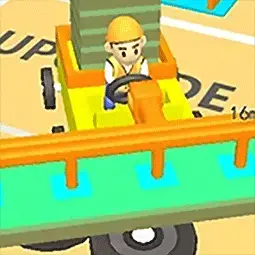
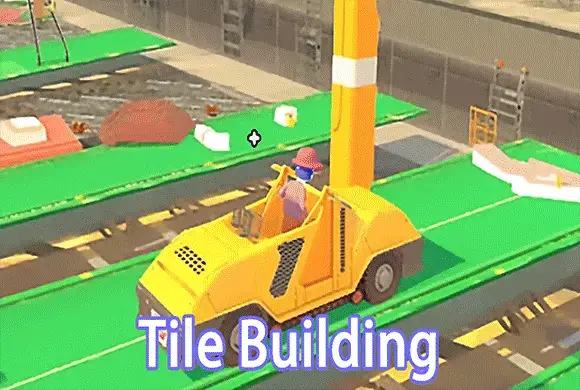
Drive your car to the resource zone to load up on colorful bricks, wood planks, and roof tiles. Then, steer it towards the construction site and watch the magic happen: the materials will automatically fly off your car and assemble into beautiful houses, paved roads, and lush gardens!

Key Game Features

Satisfying Auto-Building: Simply drive into the blueprint zone and watch your materials automatically fly out to construct beautiful 3D buildings. Vehicle Upgrades: Spend your collected coins to upgrade your car's "Capacity" and "Speed" for faster and more efficient transport. Unlock Car Skins: Earn rewards to unlock and drive a variety of fun vehicles, from classic trucks to stylish sports cars. Relaxing Gameplay: Enjoy stress-free, one-finger joystick controls combined with incredibly satisfying visual and audio feedback.

How to Play & Master

Playing Tile Building is incredibly smooth and easy to grasp. It is all about logistics, upgrading, and watching your creations grow. Step 1: Gather Materials. Use your finger to steer your vehicle towards the material spawn points. Your car will automatically stack colored tiles (like red bricks or blue roof tiles) on its back until it reaches its maximum capacity. Step 2: Start Building. Drive your fully loaded car over to the construction site. As soon as you get close, the tiles will automatically fly off your car and place themselves perfectly to build the structure. Step 3: Earn and Upgrade. For every tile successfully placed, you earn gold coins. Tap the upgrade buttons on the screen to spend your coins. Upgrading "Capacity" lets your car carry more tiles at once, and upgrading "Speed" lets you zoom back and forth much faster! Step 4: Unlock New Cars. Check the vehicle menu to see your skin collection. As you progress and earn more wealth, you can unlock cooler cars to drive around your ever-expanding 3D city. Keep transporting and building until the entire neighborhood is complete!

Game Controls

Swipe to Drive: Touch anywhere on the screen and drag your finger like a virtual joystick to steer the car in any direction. Everything else (loading and building) is automatic!

Frequently Asked Questions (FAQ)

Q: Why did my car stop picking up tiles? A: Your vehicle has reached its maximum carrying capacity. You need to drive to the construction site to unload the materials before you can pick up more. Q: How can I build the houses faster? A: Spend your coins to upgrade the "Capacity" and "Speed" stats of your vehicle. A faster car that carries more tiles will drastically reduce your building time. Q: Do I need to tap to place the blocks? A: No, the building process is completely automatic. You just need to drive the loaded car directly to the construction site.
Games>
Puzzle>
Tile Building

Tile Building

Rating
5
Orientation
Portrait
Release Date
2023-06-29
PuzzleSimulation

What is Tile Building

Drive your car to the resource zone to load up on colorful bricks, wood planks, and roof tiles. Then, steer it towards the construction site and watch the magic happen: the materials will automatically fly off your car and assemble into beautiful houses, paved roads, and lush gardens!

Key Game Features

Satisfying Auto-Building: Simply drive into the blueprint zone and watch your materials automatically fly out to construct beautiful 3D buildings. Vehicle Upgrades: Spend your collected coins to upgrade your car's "Capacity" and "Speed" for faster and more efficient transport. Unlock Car Skins: Earn rewards to unlock and drive a variety of fun vehicles, from classic trucks to stylish sports cars. Relaxing Gameplay: Enjoy stress-free, one-finger joystick controls combined with incredibly satisfying visual and audio feedback.

How to Play & Master

Playing Tile Building is incredibly smooth and easy to grasp. It is all about logistics, upgrading, and watching your creations grow. Step 1: Gather Materials. Use your finger to steer your vehicle towards the material spawn points. Your car will automatically stack colored tiles (like red bricks or blue roof tiles) on its back until it reaches its maximum capacity. Step 2: Start Building. Drive your fully loaded car over to the construction site. As soon as you get close, the tiles will automatically fly off your car and place themselves perfectly to build the structure. Step 3: Earn and Upgrade. For every tile successfully placed, you earn gold coins. Tap the upgrade buttons on the screen to spend your coins. Upgrading "Capacity" lets your car carry more tiles at once, and upgrading "Speed" lets you zoom back and forth much faster! Step 4: Unlock New Cars. Check the vehicle menu to see your skin collection. As you progress and earn more wealth, you can unlock cooler cars to drive around your ever-expanding 3D city. Keep transporting and building until the entire neighborhood is complete!

Game Controls

Swipe to Drive: Touch anywhere on the screen and drag your finger like a virtual joystick to steer the car in any direction. Everything else (loading and building) is automatic!

Frequently Asked Questions (FAQ)

Q: Why did my car stop picking up tiles? A: Your vehicle has reached its maximum carrying capacity. You need to drive to the construction site to unload the materials before you can pick up more. Q: How can I build the houses faster? A: Spend your coins to upgrade the "Capacity" and "Speed" stats of your vehicle. A faster car that carries more tiles will drastically reduce your building time. Q: Do I need to tap to place the blocks? A: No, the building process is completely automatic. You just need to drive the loaded car directly to the construction site.