





Recommended














Sudoku Fun
- Rating
- 5
- Orientation
- Portrait
- Release Date
- 2022-10-26
What is Play Sudoku Fun Free Online
Sudoku Fun is an engaging and brain-stimulating logic puzzle game designed for both beginners and Sudoku masters. Featuring a clean, intuitive interface, the game offers a fantastic way to train your brain, improve your memory, and relax your mind. It includes various difficulty levels ranging from "Fast" and "Easy" for newcomers, to "Hard" and "Expert" for seasoned players seeking a real challenge. You can also participate in Daily Challenges to collect stars and earn monthly trophies, keeping your mind sharp every day. With handy features like pencil notes, hints, an eraser, and an auto-error checker, Sudoku Fun provides a smooth and highly customizable puzzle-solving experience. Whether you want a quick mental workout during a break or a deep logic session, this game is your perfect companion.
Key Game Features
Multiple Difficulty Levels: Choose from Fast, Easy, Medium, Hard, and Expert modes to match your logic puzzle skills. Daily Challenges: Complete unique daily Sudoku puzzles to collect stars and earn shiny monthly trophies. Smart Note-Taking (Pencil): Toggle pencil mode to jot down possible numbers in empty cells, just like playing on real paper. Helpful Hint System: Use the hint feature when you get stuck to automatically reveal the correct number for a selected cell. Detailed Statistics Tracker: Monitor your progress, win rate, and best completion times to see your skills improve.
How to Play & Master
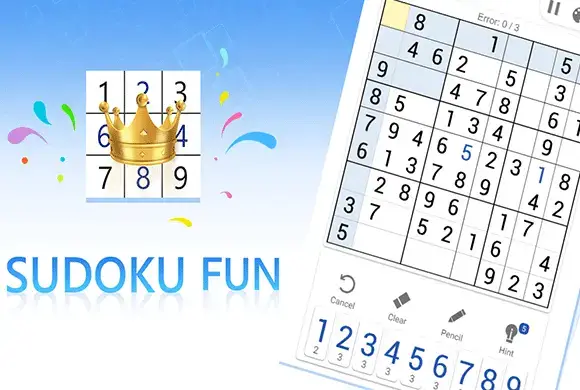
The core objective of Sudoku Fun is to fill the empty cells of the grid with numbers based on specific logic rules. In the beginner-friendly "Fast" mode shown in the game, you play on a 6x6 grid divided into smaller 2x3 subgrids. The rules are simple: every row, every column, and every subgrid must contain all the numbers from 1 to 6 without any repetitions. To start playing, select an empty cell on the board. The game will helpfully highlight the corresponding row and column. Look at the number pad at the bottom of the screen. Analyze the grid to logically deduce which number (1 through 6) is missing and doesn't conflict with existing numbers in that cell's row, column, or subgrid. Tap the correct number to place it. If you are unsure of a move, turn on the "Pencil" mode. This allows you to place tiny notes of potential numbers inside a cell. As you fill in correct numbers elsewhere, you can update your notes. Be careful, though! The game has an error tracker (e.g., Error: 0/3). If you place a wrong number that violates Sudoku rules, it registers as a mistake. Reaching the maximum allowed mistakes will fail the level. Use the "Clear" button to erase errors or the "Hint" button if you need a push. Fill the entire board correctly to win!
Game Controls
Tap to select an empty cell on the grid. Tap a number from the bottom panel to input it. Tap tool icons (Pencil, Hint, Clear, Undo) to use their respective functions.
Frequently Asked Questions (FAQ)
Q: What happens if I make 3 errors?
A: If you reach the error limit (e.g., 3/3), the current game will end in failure, and you will have to restart the puzzle or start a new one.
Q: What does the Pencil tool do?
A: The Pencil tool lets you write small, temporary numbers in a cell. This is useful for keeping track of potential candidates when you aren't sure of the final answer yet.
Q: Can I track my past performance?
A: Yes! Tap the "Statistics" tab on the home screen to view your games played, win rate, and best completion times across all difficulty levels.

Pin Rescue Puzzle
 497.5K
Magic Sort
703.3K
ColorTheTown
410.2K
Magic Jigsaw Party
512.9K
Fruit Pair Match
847.0K
Cow Saver
478.9K
Stickman Trivia Fall IO
626.1K
Pattern Puzzle 3D Game
473.3K
Long Neck Runner
223.9K
Thief Puzzle
789.2K