

logologo
Search anything...
search_icon
lang_switch_icon
search_iconAll
nav_link_icon
search_iconContinue Playing
nav_link_icon
search_iconHot Games
nav_link_icon
search_iconNew Games
nav_link_icon
search_iconSimulation
nav_link_icon
search_iconAdventure
nav_link_icon
search_iconAction
nav_link_icon
search_iconStrategy
nav_link_icon
search_iconCasual
nav_link_icon
search_iconRacing
nav_link_icon
search_iconPuzzle
nav_link_icon
search_iconSports
nav_link_icon
search_icon
search_icon
search_icon
search_icon
search_icon
search_icon
search_icon
search_icon
search_icon
search_icon
search_icon
search_icon
Your browser does not support the video tag or this video format.
Play Now
Remove Block

Remove Block

Remove Block

Remove Block

5puzzlePuzzle
Play Now
Like
Dislike
Add to favorites
Feedback
Remove Block
Advertisement
Candy Adventure

Candy Adventure

Candy Adventure362.1K
Amazing Tile

Amazing Tile

Amazing Tile227.2K
Animal Rush

Animal Rush

Animal Rush449.9K
Boom Rocket

Boom Rocket

Boom Rocket259.2K
Anime Avatar Maker

Anime Avatar Maker

Anime Avatar Maker571.1K
Yatzy Masters

Yatzy Masters

Yatzy Masters495.1K
Train Shooting

Train Shooting

Train Shooting344.8K
Classify

Classify

Classify235.2K
Star Ship

Star Ship

Star Ship879.9K
Wavy Trip

Wavy Trip

Wavy Trip779.9K
Candy Adventure

Candy Adventure

Candy Adventure362.1K
Amazing Tile

Amazing Tile

Amazing Tile227.2K
Animal Rush

Animal Rush

Animal Rush449.9K
Boom Rocket

Boom Rocket

Boom Rocket259.2K
Anime Avatar Maker

Anime Avatar Maker

Anime Avatar Maker571.1K
Yatzy Masters

Yatzy Masters

Yatzy Masters495.1K
Train Shooting

Train Shooting

Train Shooting344.8K
Classify

Classify

Classify235.2K
Star Ship

Star Ship

Star Ship879.9K
Wavy Trip

Wavy Trip

Wavy Trip779.9K
Advertisement
mascot

Company Info

AboutBusinessPrivacyTerms

Join Us

logo

© 2026 minigame.com

AboutBusinessPrivacy
logo

© 2026 minigame.com

Gamesbutton_jump_icon
Puzzlebutton_jump_icon
Remove Block

Remove Block

Rating
5
Orientation
Portrait
Release Date
2025-03-27
Puzzle

What is Remove Block

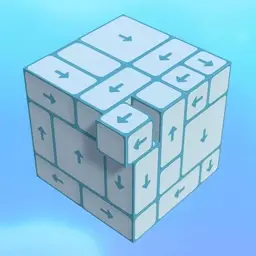
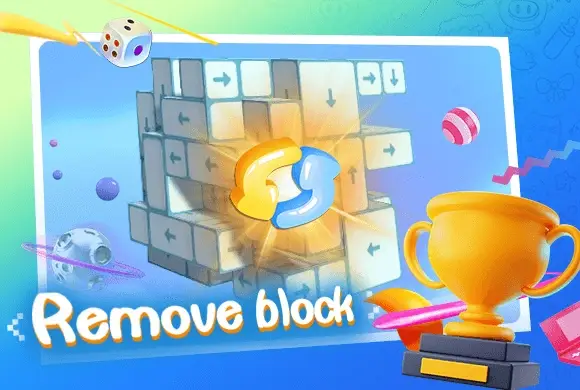
Remove Block is an engaging and highly addictive 3D spatial puzzle game designed to challenge your observation and logical planning skills. The core mechanics are remarkably intuitive: the screen features complex 3D arrays of blocks marked with arrows. Your task is to tap the blocks to send them flying in the direction indicated. However, the catch lies in the structural blockages—a block can only be removed if its path is clear of obstacles. You must rotate the entire structure 360 degrees, examining it from every angle to find the right sequence for disassembly. As you progress, the number of blocks increases and the formations become significantly more intricate, putting your spatial imagination to the ultimate test. With its clean visual style, satisfying sound effects, and minimalist controls, Remove Block offers the perfect balance of mental stimulation and stress-relieving relaxation. Can you clear all the cubes and master the higher levels?

Key Game Features

360-Degree Rotation: Rotate the 3D structures freely to examine block arrangements from every angle. This multi-dimensional perspective shifting is crucial for finding hidden openings and solving complex puzzles. Spatial Logic Challenge: More than just tapping, the game requires precise sequence calculation. Understanding block obstructions and planning the optimal disassembly strategy provides a great workout for your brain. Satisfying & Relaxing Feedback: With smooth animations and crisp block-sliding sound effects, every successful removal brings immense psychological satisfaction, making it a top choice for stress relief during breaks. Progressive Difficulty Levels: Level difficulty increases progressively, ranging from a few simple cubes to giant matrices of hundreds of blocks, ensuring players stay engaged with a constant sense of achievement.

How to Play & Master

Observe the Arrows:Carefully observe the arrow icons on each block, which indicate the direction they will fly out. Find the Opening:Identify "free blocks" whose exit paths are not obstructed by other cubes. Tap to Remove:Tap the eligible blocks to send them flying off the screen. Rotate the View:If stuck, swipe the background to rotate the 3D array and find openings from different angles. Clear to Win:Clear all blocks within the given time or moves to unlock the next challenging stage.

Game Controls

PC:Use the Left Mouse Button to click and drag the background to rotate the 3D structure; Left Click on blocks to remove them. Mobile:Swipe with one finger on the background to rotate the view; Tap on blocks to clear them.*

Frequently Asked Questions (FAQ)

Q: Why didn't the block fly away? A: Because its exit path is blocked by other cubes. Try removing the obstacles first or rotate the structure to find a clear path. Q: What if I run out of time? A: Stay calm and rotate the view quickly! You can often find groups of movable blocks from different angles—tapping them in quick succession saves a lot of time. Q: Is there a move limit? A: In this version, there is usually only a time limit. You are free to experiment with taps until you find the correct disassembly sequence.
Gamesbutton_jump_icon
Puzzlebutton_jump_icon
Remove Block

Remove Block

Rating
5
Orientation
Portrait
Release Date
2025-03-27
Puzzle

What is Remove Block

Remove Block is an engaging and highly addictive 3D spatial puzzle game designed to challenge your observation and logical planning skills. The core mechanics are remarkably intuitive: the screen features complex 3D arrays of blocks marked with arrows. Your task is to tap the blocks to send them flying in the direction indicated. However, the catch lies in the structural blockages—a block can only be removed if its path is clear of obstacles. You must rotate the entire structure 360 degrees, examining it from every angle to find the right sequence for disassembly. As you progress, the number of blocks increases and the formations become significantly more intricate, putting your spatial imagination to the ultimate test. With its clean visual style, satisfying sound effects, and minimalist controls, Remove Block offers the perfect balance of mental stimulation and stress-relieving relaxation. Can you clear all the cubes and master the higher levels?

Key Game Features

360-Degree Rotation: Rotate the 3D structures freely to examine block arrangements from every angle. This multi-dimensional perspective shifting is crucial for finding hidden openings and solving complex puzzles. Spatial Logic Challenge: More than just tapping, the game requires precise sequence calculation. Understanding block obstructions and planning the optimal disassembly strategy provides a great workout for your brain. Satisfying & Relaxing Feedback: With smooth animations and crisp block-sliding sound effects, every successful removal brings immense psychological satisfaction, making it a top choice for stress relief during breaks. Progressive Difficulty Levels: Level difficulty increases progressively, ranging from a few simple cubes to giant matrices of hundreds of blocks, ensuring players stay engaged with a constant sense of achievement.

How to Play & Master

Observe the Arrows:Carefully observe the arrow icons on each block, which indicate the direction they will fly out. Find the Opening:Identify "free blocks" whose exit paths are not obstructed by other cubes. Tap to Remove:Tap the eligible blocks to send them flying off the screen. Rotate the View:If stuck, swipe the background to rotate the 3D array and find openings from different angles. Clear to Win:Clear all blocks within the given time or moves to unlock the next challenging stage.

Game Controls

PC:Use the Left Mouse Button to click and drag the background to rotate the 3D structure; Left Click on blocks to remove them. Mobile:Swipe with one finger on the background to rotate the view; Tap on blocks to clear them.*

Frequently Asked Questions (FAQ)

Q: Why didn't the block fly away? A: Because its exit path is blocked by other cubes. Try removing the obstacles first or rotate the structure to find a clear path. Q: What if I run out of time? A: Stay calm and rotate the view quickly! You can often find groups of movable blocks from different angles—tapping them in quick succession saves a lot of time. Q: Is there a move limit? A: In this version, there is usually only a time limit. You are free to experiment with taps until you find the correct disassembly sequence.