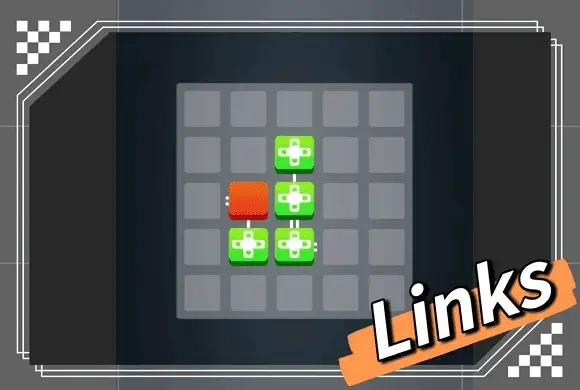
"LINKS" is a beautifully minimalist and deeply engaging logic puzzle game designed to sharpen your mind and help you relax. The game presents a clean, dark grid where your objective is to connect a single red starting block to all the yellow target blocks. Sounds simple? The challenge is that you must connect them in a single, continuous path without crossing your own line! With its sleek 2D graphics, intuitive swipe controls, and progressively challenging levels, "LINKS" is a fantastic brain-teaser for players of all ages. Whether you want to kill a few minutes or immerse yourself in hours of pathfinding logic, this game offers a satisfying and stress-free puzzle experience without any distracting timers.
Minimalist Design: Enjoy a clean, distraction-free visual style with smooth animations. Logic Puzzles: Train your brain with pathfinding and continuous line challenges. Multiple Difficulties: Progress through Easy, Medium, and Hard level collections. Intuitive Controls: Simply drag your finger to draw the connecting path. Helpful Hints: Use the hint system if you get stuck on a tricky level. Offline Play: No Wi-Fi required; play anywhere, anytime at your own pace.
The goal of "LINKS" is to connect the red block to all the yellow blocks on the grid. Starting: Look at the grid. You will see one Red block (the starting point) and one or more Yellow blocks (the targets). Notice the small white connectors on the sides of the blocks. Connecting: Touch the Red block and drag your finger to draw a line towards a Yellow block. The Rules: Continuous Path: You must connect all the yellow blocks in one single, continuous line starting from the red block. Valid Connections: You can only connect to the sides of the blocks that have the white connector marks. No Crossing: Your line cannot cross over itself or overlap. Completing the Level: Once all yellow blocks are successfully connected in a single chain without breaking any rules, the level is completed! Mistakes: If you make a wrong turn, simply trace your finger backward along the line to erase it, or use the reset option to start the level over.
Drag: Touch the red block and drag to draw the connecting line. Reverse Drag: Drag backward along an existing line to erase it.
Q: Can I connect the blocks in any order? A: Yes, as long as you form a single, continuous path that connects all the yellow blocks to the red one without crossing. Q: What if I get completely stuck? A: You can tap the "Hint" button (usually a lightbulb icon) to reveal a part of the correct path to guide you. Q: Why won't my line connect to the yellow block? A: Make sure you are drawing the line into the side of the yellow block that has the small white connection points. You cannot connect to a flat side.