






Recommended




Keep Zombie Away
- Rating
- 5
- Orientation
- Portrait
- Release Date
- 2022-05-12
What is Keep Zombie Away
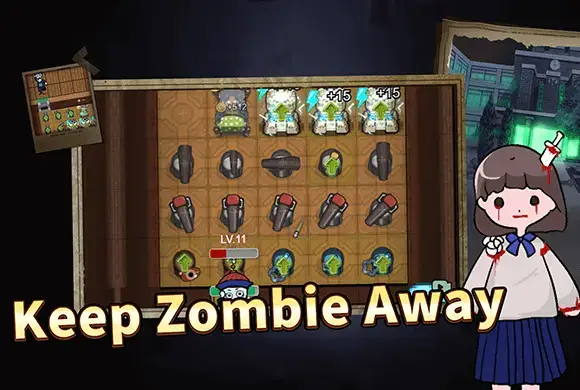
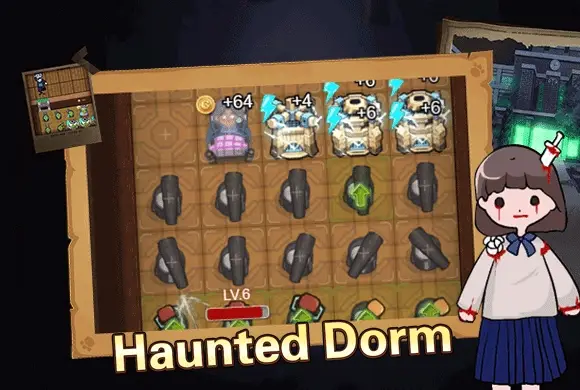
Welcome to Keep Zombie Away, a thrilling and strategic tower defense survival game where your bed is your best weapon! Set in a creepy, dimly lit school dormitory, you and other players must survive the night against a terrifying, relentless zombie. As the countdown begins, you must quickly scramble to find an empty room, close the door, and jump into bed. Once asleep, you will start generating coins automatically. Use this passive income wisely to upgrade your wooden door, build defensive turrets, and construct generators to produce energy for advanced technologies. But beware—the zombie will randomly attack doors to break in and eliminate players. You must constantly balance repairing your door with upgrading your weapons to fend off the undead menace. Can you outsmart the monster, build the ultimate fortress, and survive until dawn? Join the suspenseful adventure in Keep Zombie Away today!
Key Game Features
Thrilling Survival Gameplay: Experience the intense pressure of finding a room and building defenses before the zombie breaks your door down. Strategic Tower Defense: Balance your resources between upgrading your bed for more coins and fortifying your door for better protection. Diverse Upgrades & Tech: Unlock and build turrets, repair consoles, and resource piles to create an impenetrable fortress. Cool Character Skins: Earn coins to unlock a variety of unique and stylish skins for your survivor avatar from the Gacha machine.
How to Play & Master
Playing Keep Zombie Away is incredibly intense and requires quick decision-making. When the game starts, you will find yourself in a school hallway with other characters. A countdown timer will appear on the screen. You must immediately use the joystick to run and enter an empty dormitory room before the timer runs out or the zombie catches you. Once inside, approach the bed to automatically close the door and start sleeping. While you sleep on the bed, you will continuously generate coins. This is the core resource of the game. At the bottom of the screen, you can access the "Upgrade" and "Building" menus. Use your accumulated coins to upgrade your bed, which will increase your coin production rate per second. At the same time, keep an eye on your door's HP. You must spend coins to upgrade the door to withstand the zombie's powerful attacks. When the zombie starts attacking your door, an alarm will sound, and the door's health will deplete. You can hit the green "Repair" button (wrench icon) to restore its HP. To fight back, open the Building menu and place defensive turrets on the empty grid tiles in your room. Turrets will automatically shoot the zombie when it comes near. As you progress, you will need "Energy" (lightning bolts) to buy advanced items. Build Generators to produce energy, which allows you to purchase powerful tools from the Shop, such as the "Repair Console" for automatic healing or the "Net Trap" to slow the zombie down. Balance your economy and defenses perfectly to defeat the zombie and win the match!
Game Controls
Movement: Use the on-screen virtual joystick to move your character around the hallways. Interaction: Walk up to an empty bed to enter it. Tap the UI buttons to open the upgrade/building menus, select items to place on the floor grid, and tap the wrench icon to repair the door.
Frequently Asked Questions (FAQ)
Q: What should I do if the zombie attacks my door early in the game?
A: Immediately tap the green "Repair" button repeatedly to keep the door's HP up. Meanwhile, try to quickly upgrade your bed to earn more coins so you can upgrade the door's max HP.
Q: How do I get lightning (Energy)?
A: You need to build a "Generator" from the "Building" menu. Once placed in your room, it will slowly generate energy over time, which is required for purchasing and upgrading advanced buildings.
Q: What happens if I go into a room with someone already in it?
A: You cannot share a room with another player or bot. You must quickly leave and find a completely empty room before the zombie arrives, otherwise, you will be left in the hallway and eliminated!
Cat Hero
 782.2K
Follow My Command
807.7K
Lumber Hero Goblins Defense
612.6K
King Simulator
537.7K
evolution of wukong
793.6K
Aegis Saga
771.7K
Zombie Tower
431.5K
ZombieVsFlower
457.5K
Backpack Block TD
762.3K
Zombie Knocks Door 3D
647.7K