


logologo
Search anything...
search_icon
search_iconAll
search_iconContinue Playing
search_iconHot Games
search_iconNew Games
search_iconSimulation
search_iconAdventure
search_iconAction
search_iconStrategy
search_iconCasual
search_iconRacing
search_iconPuzzle
search_iconSports
search_iconMore
AboutAbout
BusinessBusiness
PrivacyPrivacy
TermsTerms

© 2026 minigame.com

mascot

Join The Minis With Friends

search_icon
search_icon
search_icon
search_icon
search_icon
search_icon
search_icon
search_icon
search_icon
search_icon
search_icon
search_icon
more_icon
AboutBusinessPrivacyTerms
Your browser does not support the video tag or this video format.
Play Now
Anime Avatar Maker

Anime Avatar Maker

Anime Avatar Maker
Play Now
Like
Dislike
Add to favorites
Feedback

Recommended

Yeloli Princess Makeup
Jelly Crush
Ninja Legend
Cube Mania
Pets Match
Hoop Stars
Shopping Mall Tycoon
Fruit Master
Stone Line
My Field
Mutant Dinosaurs
Jelly Boom
Yeloli Dress Up
Royal Battle
Love Challenge
Ninja Sword
Idle Rancher

Idle Rancher

Idle Rancher
Idle Rancher608.4K
Chop.io

Chop.io

Chop.io
Chop.io1.3M
Pop Stone2

Pop Stone2

Pop Stone2
Pop Stone24.8M
Mecha Beasts

Mecha Beasts

Mecha Beasts
Mecha Beasts278.4K
Bubble Legend

Bubble Legend

Bubble Legend
Bubble Legend1.2M
Crazy Ball

Crazy Ball

Crazy Ball
Crazy Ball667.7K
Bubble Spinner

Bubble Spinner

Bubble Spinner
Bubble Spinner1.1M
Tiny Clash

Tiny Clash

Tiny Clash
Tiny Clash246.5K
Best Link

Best Link

Best Link
Best Link359.0K
My Fairies Dress Up

My Fairies Dress Up

My Fairies Dress Up
My Fairies Dress Up137.9K
AboutBusinessPrivacy
logo

© 2026 minigame.com

Games>
Casual>
Anime Avatar Maker

Anime Avatar Maker

Rating
5
Orientation
Portrait
Release Date
2025-04-02
Casual

What is Anime Avatar Maker

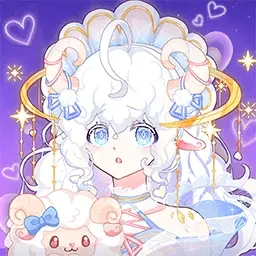
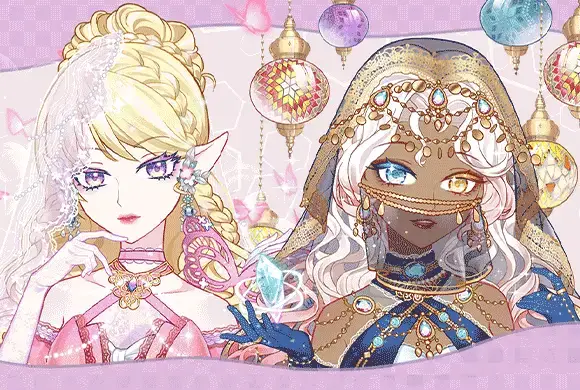
Anime Avatar Maker is the ultimate creative sanctuary for fans of anime and fashion. In this highly customizable 2D simulation game, you have the power to bring your dream characters to life. The game offers a comprehensive suite of design tools, allowing you to tweak every detail from eye shape and pupil color to intricate hairstyles and expressions. Beyond facial features, dive into a massive digital wardrobe filled with everything from elegant princess gowns and trendy school uniforms to modern streetwear. Add a touch of magic with accessories like shimmering wings, stylish hats, and sparkling jewelry. The game also features a daily sign-in system and blind boxes to unlock exclusive items. Once your masterpiece is complete, choose a beautiful background, take a high-quality photo, and save it as your personal avatar. Whether you’re a budding artist or just love dress-up fun, Anime Avatar Maker provides endless hours of creative exploration.

Key Game Features

Infinite Customization: Tweak facial features, hairstyles, and skin tones to create truly unique anime personas. Massive Fashion Library: Choose from thousands of clothing items, including dresses, school uniforms, and casual wear. Daily Rewards & Blind Boxes: Unlock rare accessories and exclusive outfits through consistent sign-ins and fun blind box openings. Stunning Art & Backgrounds: Enjoy high-quality anime-style visuals and a variety of scenic backdrops for your character.

How to Play & Master

Start by selecting an empty character slot on the main menu. First, customize the facial features by selecting tabs for eyes, eyebrows, nose, and mouth. You can choose from various colors and styles for each. Next, move on to the hair section to pick bangs and back hairstyles. After the base is ready, open the clothing menu to browse through tops, skirts, socks, and shoes. Tap on any item to see it applied to your character instantly. Many special items can be unlocked by watching a short video. Once satisfied, click the background tab to select a setting. Finally, tap the camera icon to take a photo of your avatar. Your design will be ranked, and you can save it directly to your device!

Game Controls

Tap: Select items, categories, and navigate menus. Scroll: Browse through long lists of accessories and clothes.

Frequently Asked Questions (FAQ)

Q: How do I unlock items with a movie icon? A: These are premium items that can be unlocked by watching a short rewarded advertisement. Q: Can I edit a character after saving it? A: Yes, simply select the saved character in the "Choose image" screen and click the "Edit" button to make changes. Q: Where are my photos saved? A: Photos are typically saved to the in-game gallery, and you can also choose to save them to your mobile device's local photo album.
Games>
Casual>
Anime Avatar Maker

Anime Avatar Maker

Rating
5
Orientation
Portrait
Release Date
2025-04-02
Casual

What is Anime Avatar Maker

Anime Avatar Maker is the ultimate creative sanctuary for fans of anime and fashion. In this highly customizable 2D simulation game, you have the power to bring your dream characters to life. The game offers a comprehensive suite of design tools, allowing you to tweak every detail from eye shape and pupil color to intricate hairstyles and expressions. Beyond facial features, dive into a massive digital wardrobe filled with everything from elegant princess gowns and trendy school uniforms to modern streetwear. Add a touch of magic with accessories like shimmering wings, stylish hats, and sparkling jewelry. The game also features a daily sign-in system and blind boxes to unlock exclusive items. Once your masterpiece is complete, choose a beautiful background, take a high-quality photo, and save it as your personal avatar. Whether you’re a budding artist or just love dress-up fun, Anime Avatar Maker provides endless hours of creative exploration.

Key Game Features

Infinite Customization: Tweak facial features, hairstyles, and skin tones to create truly unique anime personas. Massive Fashion Library: Choose from thousands of clothing items, including dresses, school uniforms, and casual wear. Daily Rewards & Blind Boxes: Unlock rare accessories and exclusive outfits through consistent sign-ins and fun blind box openings. Stunning Art & Backgrounds: Enjoy high-quality anime-style visuals and a variety of scenic backdrops for your character.

How to Play & Master

Start by selecting an empty character slot on the main menu. First, customize the facial features by selecting tabs for eyes, eyebrows, nose, and mouth. You can choose from various colors and styles for each. Next, move on to the hair section to pick bangs and back hairstyles. After the base is ready, open the clothing menu to browse through tops, skirts, socks, and shoes. Tap on any item to see it applied to your character instantly. Many special items can be unlocked by watching a short video. Once satisfied, click the background tab to select a setting. Finally, tap the camera icon to take a photo of your avatar. Your design will be ranked, and you can save it directly to your device!

Game Controls

Tap: Select items, categories, and navigate menus. Scroll: Browse through long lists of accessories and clothes.

Frequently Asked Questions (FAQ)

Q: How do I unlock items with a movie icon? A: These are premium items that can be unlocked by watching a short rewarded advertisement. Q: Can I edit a character after saving it? A: Yes, simply select the saved character in the "Choose image" screen and click the "Edit" button to make changes. Q: Where are my photos saved? A: Photos are typically saved to the in-game gallery, and you can also choose to save them to your mobile device's local photo album.